Linux directory structure and files
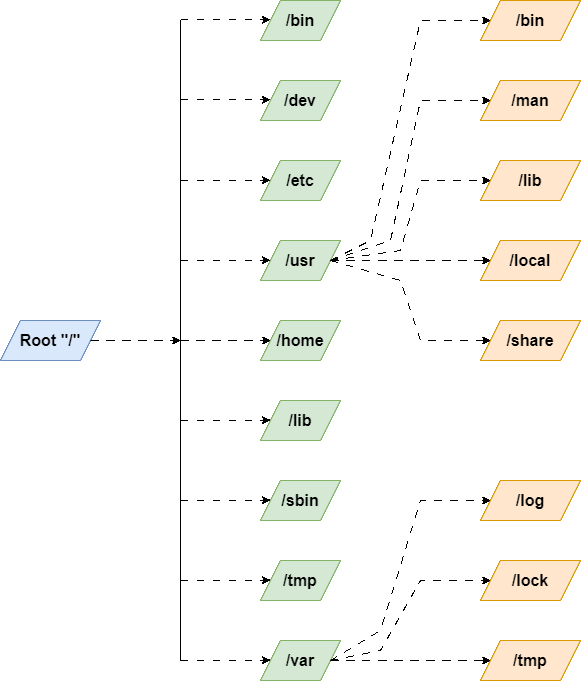
Root :
Exploring the Root Directory reveals that the '
/'symbolizes the top-level directory in the Linux file system hierarchy, serving as the parent directory for all other directories and files.The root directory contains various important directories, such as '
bin' (which contains essential executables), 'etc' (which stores configuration files), 'home' (which holds user home directories), and 'lib' (which contains shared libraries). Each of these directories plays a crucial role in the overall functioning of the Linux system.bin :
The /bin directory contains binary executable files that are accessible to all users on the system. These executables are commonly used by both the system and regular users, allowing them to perform various tasks such as file manipulation, text processing, and shell scripting
dev :
The /dev/ directory consists of files that represent devices that are attached to the local system. However, these are not regular files that a user can read and write to; these files are called devices files or special files:
etc :
The /etc/ directory all your system configuration files are stored
usr :
This is one of the most critical directories in the Linux system. The /usr directory is a directory that comprises libraries, binaries, and documentation for installed software applications.
bin :
The /usr directory can store all read-only files that can be shared among users. When normal users install software on the system, the binaries usually go to /usr/bin and the liberaries to /usr/lib. We don't need these binaries for booting or repairing the system. In essence, normal users employ these executable programs and files. Programs like diff, du and scp some common examples of binaries that go in /usr/bin.
home :
Linux Home Directory or partition stores personal directories of each user, which is restricted only to the homeowner and root user.
lib :
These are the directories where we store all the common functions used by the programs
tmp :
The tmp directory stored temporarily files.
var :
In Linux, /var is a standard directory that stands for "variable files". As the name suggests, this directory contains data that changes frequently while the system is running.
